Plug & Play Wireless CarPlay Adapter: How to Cut the Cable on Your Factory Head Unit
If your car came with Apple CarPlay but you still have to plug your phone in with a cable every single time, you know how quickly that gets old. The cable wears out, the port loosens, and reaching for it in the dark is a minor daily annoyance. The good news: you almost certainly don’t need to replace your head unit to fix it.
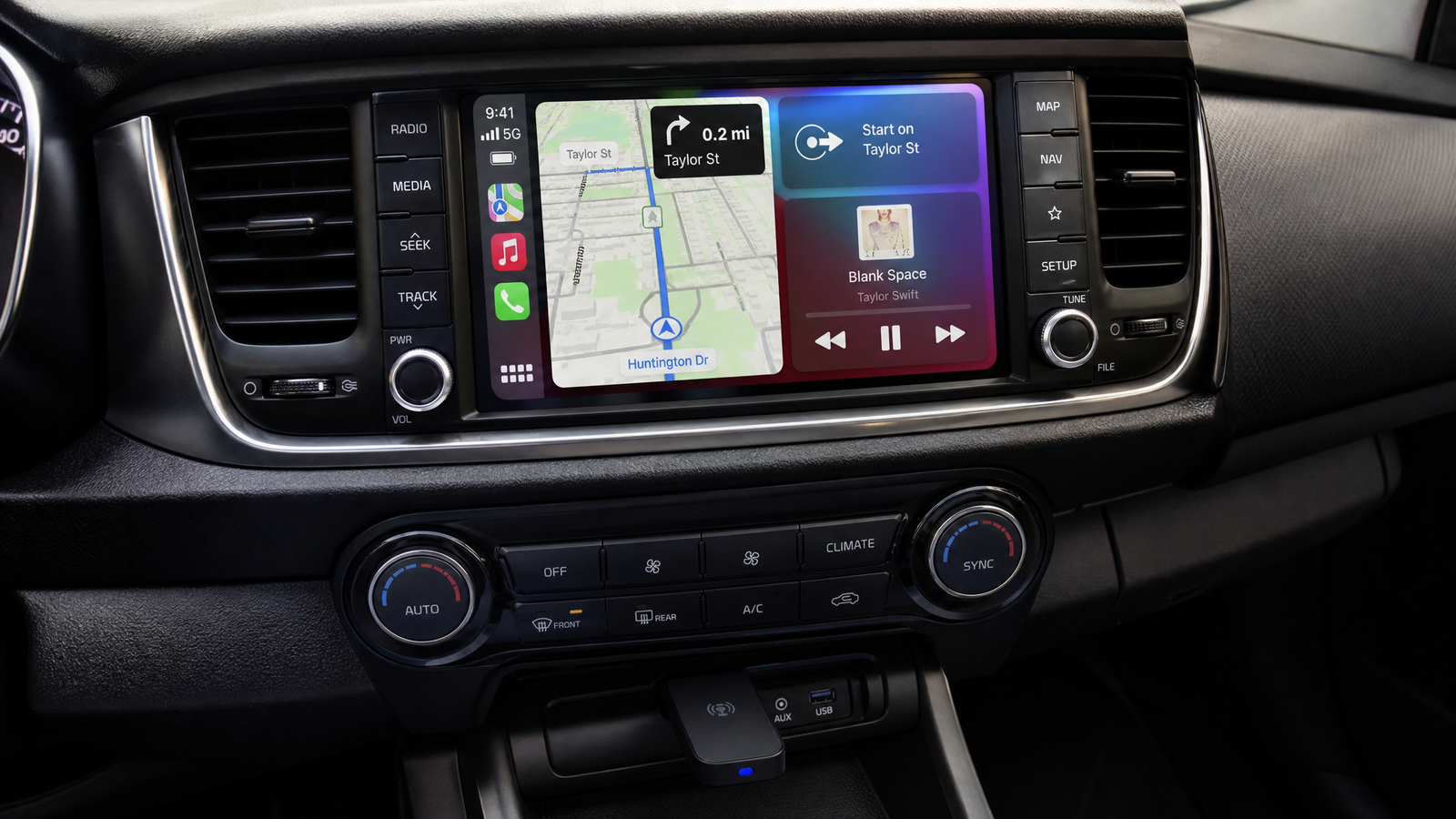
The plug and play wireless CarPlay adapter converts your car’s existing wired CarPlay into a fully wireless connection. You plug it in once, pair your phone, and from then on CarPlay simply appears whenever you get in the car — no cable, no app to install, and none of your factory controls lost.
How It Works
Your car’s factory system already knows how to run CarPlay — it just expects the phone on the end of a USB cable. This adapter sits in that USB port and acts as a permanent, always-connected “phone” that the head unit talks to over the cable, while it talks to your actual iPhone wirelessly.
It bridges the two using Bluetooth 5.0 for pairing and 5GHz WiFi for the high-bandwidth data link that carries the screen mirroring, navigation, and audio. The result is the same CarPlay interface you already have, minus the cable.
Setup: Genuinely Plug and Play
There’s no wiring, no disassembly, and no configuration file to load. Setup is three steps:
- Plug the adapter into your car’s factory USB or Type-C CarPlay port.
- Pair your iPhone to the adapter over Bluetooth the first time.
- Done — CarPlay launches wirelessly.
From that point on, the adapter auto-reconnects every time you enter the vehicle. You get in, and within a few seconds CarPlay is up on your factory screen exactly as before, without touching your phone.
Your Factory Controls Stay Exactly as They Were
A common worry with any retrofit is losing the buttons you actually use. This adapter doesn’t touch them. Because it works through your existing CarPlay system, it fully preserves:
- Steering wheel controls
- Rotary knob (iDrive-style controllers and similar)
- Physical buttons on the dash and centre console
You’re not replacing the interface — you’re just cutting the cable that fed it. Everything you already know how to operate keeps working.
Compatibility: The One Thing to Check First
This is the most important part, so it’s worth being clear. The adapter works with 99% of vehicles that already have OEM factory wired CarPlay. If your car currently runs CarPlay when you plug your phone in with a cable, this adapter will almost certainly make it wireless.
What it cannot do is add CarPlay to a car that never had it. If your vehicle never supported wired CarPlay from the factory, this adapter has no CarPlay system to convert. In that case you’d want a standalone screen such as the Universal Car Screen with CarPlay and Android Auto, which brings CarPlay to any vehicle regardless of what the factory fitted.
Device Requirements
| Requirement | Detail |
|---|---|
| Connectivity | Bluetooth 5.0 + 5GHz WiFi |
| Vehicle | 99% of cars with OEM factory wired CarPlay |
| iPhone | iOS 10 or later |
| Android | Android 11+ with 5GHz WiFi support required |
| Setup | Plug into factory USB/Type-C port, pair, done |
| Reconnection | Automatic, every time you enter the vehicle |
A quick note for Android users: the adapter also supports wireless Android Auto, but your phone must run Android 11 or newer and support 5GHz WiFi. If your phone only has 2.4GHz WiFi, the wireless link won’t work, so check that spec before ordering.
Why Go Wireless?
- No more cable wear — the biggest cause of intermittent CarPlay dropouts is a tired USB cable or port. Remove the cable, remove the problem.
- Instant connection — get in, and CarPlay is ready before you’ve fastened your seatbelt.
- Cleaner cabin — no cable draped across the centre console.
- Phone stays in your pocket or wireless charger — no need to fish it out and plug it in.
Who Is This For?
This adapter is the ideal upgrade if you already enjoy CarPlay in your car and simply want to lose the cable. It’s a small, inexpensive change that removes a daily friction point without altering anything about how your car’s interface behaves.
If, on the other hand, your car has no CarPlay at all — an older vehicle, a basic-spec trim, or an aftermarket radio without smartphone integration — then the adapter isn’t the right product, and a dedicated CarPlay screen is the way to add it.
Frequently Asked Questions
Does this work on any car?
It works with 99% of vehicles that already have OEM factory wired CarPlay. It does not add CarPlay to cars that never had it from the factory.
Do I lose my steering wheel controls or rotary knob?
No. Because it works through your existing CarPlay system, it fully preserves steering wheel controls, the rotary knob, and physical buttons.
What do I need for wireless Android Auto?
Your phone must run Android 11 or newer and support 5GHz WiFi. iPhones need iOS 10 or later.
Is there an app to install?
No. Setup is plug and play — connect it to the factory USB/Type-C port, pair over Bluetooth once, and it auto-reconnects every time after that.
My car doesn’t have CarPlay at all — will this add it?
No. This adapter only converts existing wired CarPlay to wireless. To add CarPlay to a car that never had it, use a standalone unit like the Universal Car Screen with CarPlay and Android Auto.
Where to Buy the Wireless CarPlay Adapter
The Plug & Play Wireless CarPlay / Android Auto Adapter is available at SpeedXperts for €57,94. It’s one of the simplest and most satisfying upgrades you can make if your car already has wired CarPlay.
If your vehicle doesn’t have factory CarPlay, look at the Universal Car Screen with CarPlay and Android Auto instead, or browse the full SpeedXperts shop for more car electronics.